
Using AI in the Chronolator Browser Tools
Security & Privacy
Chronolator is built for security: your data is never sent to the web for processing. You remain in total control via a manual "Copy & Paste" workflow.
Note: Once data is pasted into an AI assistant, that provider’s privacy and confidentiality rules take over.
How it works
A table on the AI assistants page lets you decide what to copy to the clipboard.
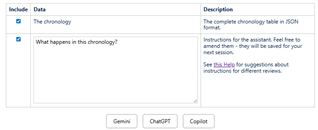 |
|
Prompt Gallery
While the default prompt is effective, you can use more complex instructions for deeper analysis. Here are a few examples:
Patient Safety & Clinical Governance
In healthcare, the goal is often Root Cause Analysis (RCA). You are looking for system failures rather than just individual blame.
- Systemic Failure Prompt: Analyze this chronology to identify 'latent errors' - systemic issues (e.g., staffing, communication protocols, equipment availability) that existed before the adverse event occurred. Organize these into a table categorized by 'Type of Error' and 'Potential Mitigation'.
- Deviation from Protocol Prompt: Compare the events in this chronology against standard [Insert Clinical/Safety Guideline, e.g., 'Sepsis pathway' or 'Medication administration protocols']. Highlight any instances where the actions taken deviated from established best practice.
- The "Near Miss" Prompt: Identify any events in this timeline that could have been identified as 'near misses' or 'warning signs' before the major incident. What specific actions could have been taken at those moments to interrupt the trajectory toward the adverse outcome?
Human Resources & Disciplinary Reviews
In HR, the focus is on procedural fairness, policy compliance, and establishing a clear record of performance or conduct.
- Policy Compliance Prompt: Analyze the behavior of [Employee Name] over time. Is there an escalating pattern of misconduct, or are these isolated incidents? Distinguish between circumstantial evidence and documented facts.
- Pattern of Conduct Prompt: Compare the events in this chronology against standard [Insert Clinical/Safety Guideline, e.g., 'Sepsis pathway' or 'Medication administration protocols']. Highlight any instances where the actions taken deviated from established best practice.
- Documentation Gap Prompt: Review the chronology for 'information gaps' that would weaken a disciplinary case. Where is there a lack of evidence or an undocumented period that would be a vulnerability in a fair hearing?
Crime Reviews & Incident Investigations
In criminal or security reviews, the focus is on sequence, opportunity, and factual consistency.
- The Inconsistency Prompt: Compare the [Witness Statement A] against the [Factual Timeline]. Highlight any factual contradictions, such as timelines that do not align with physical evidence or documented movements.
- The "Dark Period" Prompt: Identify any 'dark periods' in this chronology—time intervals exceeding [X minutes/hours] where there is no recorded activity or observation. Explain why these gaps might be significant for the investigation.
- Causality & Opportunity Prompt: Based on the movements recorded in the timeline, evaluate the 'opportunity' for [Subject Name] to have committed the incident at [Time]. Are there any recorded events that make this scenario unlikely or impossible?