
Chronolator for Word |
|


 Chronolator for Word is no longer supported. The information below is for those few customers who continue to use it.
.png) The Chronolator Browser Tools can read .docx files from Microsoft Word, Google Docs, LibreOffice Writer and other programs. See Chronolator and .docx files.
The Chronolator Browser Tools can read .docx files from Microsoft Word, Google Docs, LibreOffice Writer and other programs. See Chronolator and .docx files.
The Browser Tools and Chronolator for Word use different types of file. This section describes how to transfer chronologies between them.
Transfer from Word to one of the Chronolator Browser Tools
On the Chronolator toolbar, press Publish > JSON to produce a file in JSON format:
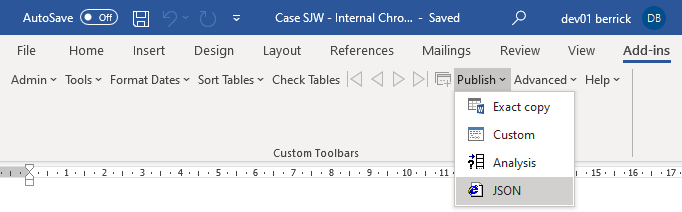
Note that the JSON file is unencrypted and readable by humans with a simple text editor. If you want to prevent this, open it in one of the Chronolator Browser Tools and save it as a txt file that only the browser tools can interpret.
If you want to further protect the chronology with a password, follow the instructions here.
Transfer from one of the Chronolator Browser Tools to Word (or Excel or other program)
There are four ways to transfer data from the Chronolator Browser Tools to Word:
 use the Chronolator Conversion Tool
import a JSON file into a Composite Chronology
use the Clipboard
export the chronology to a docx file by using the Export > docx button above the chronology.
Use the Conversion Tool if you want to use Chronolator for Word features. If you only want to produce a plain Word document, you can use the Clipboard as described here.
Using the Conversion Tool
The conversion tool works on a JSON file. To make one in one of the Chronolator Browser Tools, press File > Save As > JSON.
If you already have a Chronolator for Word licence, you will find the Conversion Tool in the ChronologySetup folder.
If you do not, you can download it from www.chronolator.com/downloads/download-conversion-tool.htm.
In either case, the aforementioned Web page includes instructions about how to use it.
Importing a JSON file into a Composite Chronology
Chronolator for Word Version 5.00 Composite Chronologies can import JSON files, except for the very first one. To start a new Composite Chronology with a JSON file, you should download the latest version of the Blank Composite Chronology from www.chronolator.com/downloads/download-composite-chronology.htm instead of creating one in the Online Workbench.
Copyright © Berrick Computing Ltd 2026