
Using a Sequence Column |
|


The first column in a chronology table can be a Sequence Column. This provides two main benefits:
 it can contain a reference number for each event.
you can use it to specify the order of events on a particular day when you do not know their times.
Defining a Sequence Column
The Case Review Administrator can define a Sequence Column when setting up the chronology document.
Chronology users can define one in the tool they are using Tools > Edit > Sequence column > Add column (this is the only change Chronolator allows to Administrator-defined column headings).
Updating Sequence Numbers
When you first add a Sequence Column, Chronolator automatically adds a sequence number to each event.
Later, you can update the numbers at any time - for example, if some events are added or removed.
Press Tools > Edit > Sequence column
and then
Press Update - sequential to give each event a unique number or Update - group by day to start the numbering at 1 on each new day
Press Clear to delete the numbers in the column
Forcing events into order
Sometimes you might not know at what time events happened on a particular day, but you do know their order. You can use the Sequence Column to specify it.
|
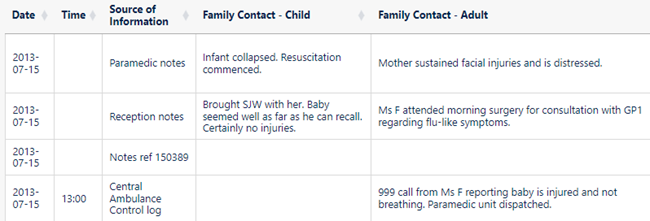
In this example, the time has only been given for one of the events of July 15 (2013-07-15), and events are in the wrong order (in the first one an infant has collapsed, while in the second he seemed well): |
|
|
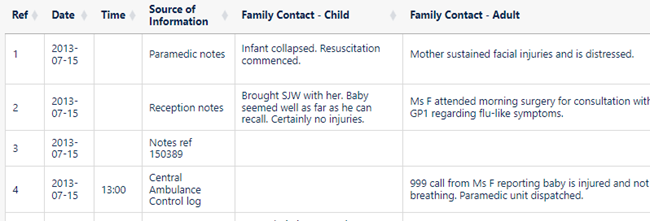
We can put them in the right order by adding a Sequence column ...
|
|
|
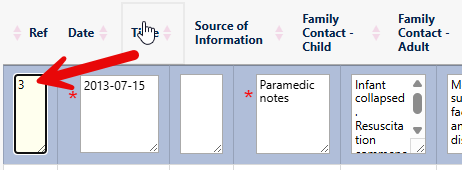
... and editing each event, putting the desired sequence number in it and pressing |
|
|
After you have edited each event ... |
|
|
... sort the table using the Sort button above it
|
|
|
|
|

.png)
.png)
.png)
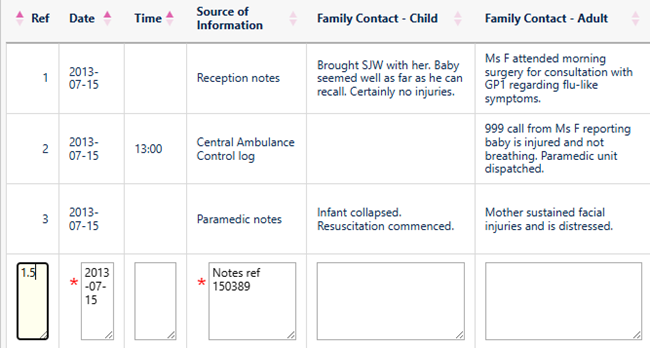
You do not always have to update sequence numbers in all the events, as the sort recognises decimal numbers. For example, suppose that you now wanted to put event 4 before event 2 (this might not make sense in terms of the story, but we will do it here just to illustrate the feature).
|
Replace the 4 in the event with a number between 1 and 2 - 1.5 say:
|
|
|
After you have updated the event, sort the table ... |
|
|
|
|
|
... and then you can update the numbers as described above |
|
.png)
.png)
Sequence column conflicts when merging chronologies
Because anybody can add a Sequence column it might happen that a chronology you are importing has one but not the one you are importing into, and vice versa.
When such conflicts occur, Chronolator Integrate adds a column to the chronology that lacks one.
Copyright © Berrick Computing Ltd 2026